FXNewsGuard for MT4 – The Missing News Filter EA
Automatically block trading before and after high-impact news. MT4 has no calendar — FXNewsGuard fills the gap
Features
News Protection.
Autotrading automatically pauses before and after high-impact news events, keeping you safe from sudden volatility. You can fully customize the embargo window, both before and after the event.
Prop Firm Compliance.
FXNewsGuard helps you pass and maintain funded accounts by automatically respecting prop firm news trading restrictions. Many firms (FTMO, The5ers, InstantFunding, and others) prohibit opening or closing trades in the minutes before and after high-impact news releases.
With FXNewsGuard, you can:
- Define custom embargo windows (e.g. 2 minutes, 5 minutes, or more) before and after news events.
- Prevent new trades, pending orders, or order closures during the restricted periods by an expert advisor.
- Safely hold existing trades without worrying about accidental rule violations.
This ensures your strategy stays compliant with prop firm rules, avoids disqualified profits, and protects your funded account.
Time Slot Scheduling.
Define daily trading windows (Mon–Sun) when autotrading is allowed.
Multi-Broker Support.
Works on any MT4 broker. Since MT4 does not provide a built-in calendar, FXNewsGuard connects to its own lightweight external feed. No extra plugins are required — everything runs directly inside your MT4 terminal
CSV Logging.
Keeps a detailed log of every toggle action for analysis and compliance. You always know exactly when and why trading was enabled or disabled
Set & Forget.
Attach once to any chart — FXNewsGuard manages everything in the background. No manual intervention required — it just works reliably, day after day
How it works?
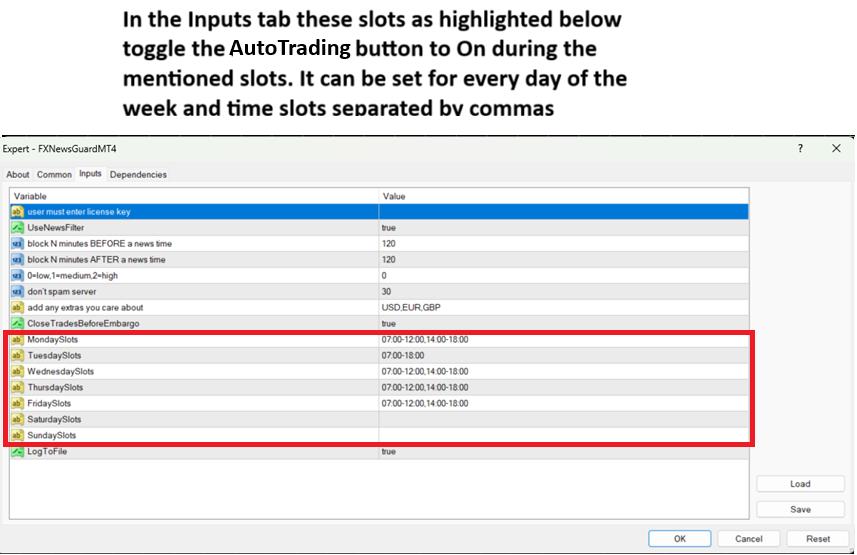
Once the instructions have been followed and the EA has been succesfully attached to the chart. The following will be visible. Time slots for autotrading to be toggled on can be set as shown.
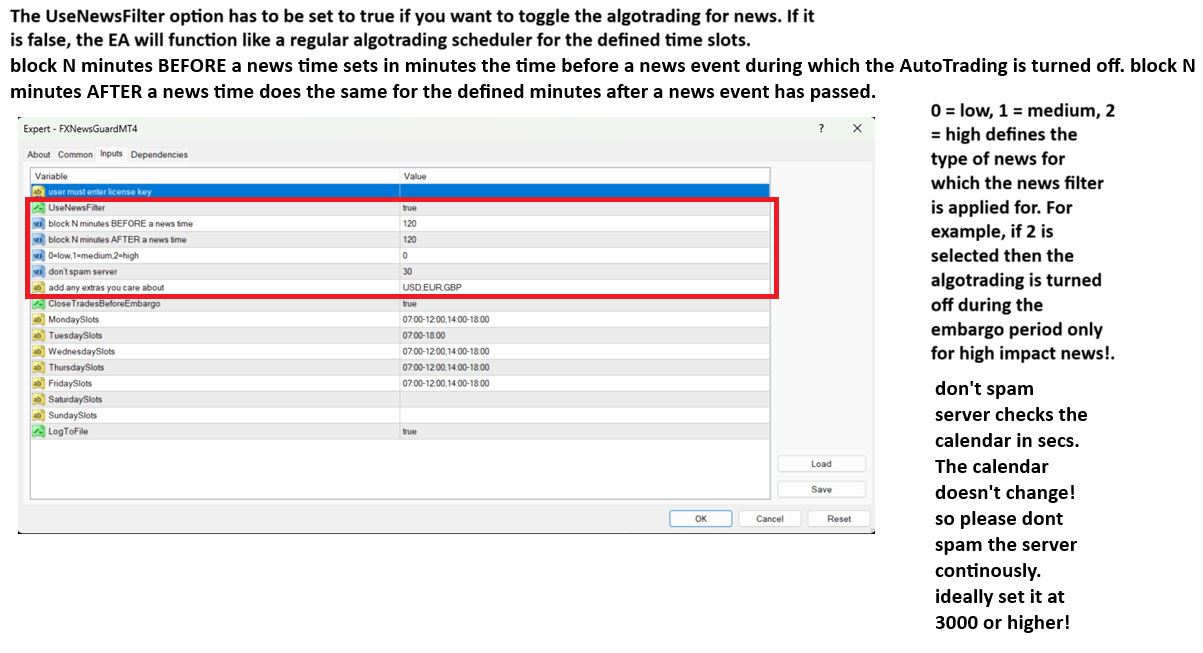
Once the time slots have been set then the EA allows for setting embargo times for toggling autotrading around news events and also filter the news events according to their impact on the market.
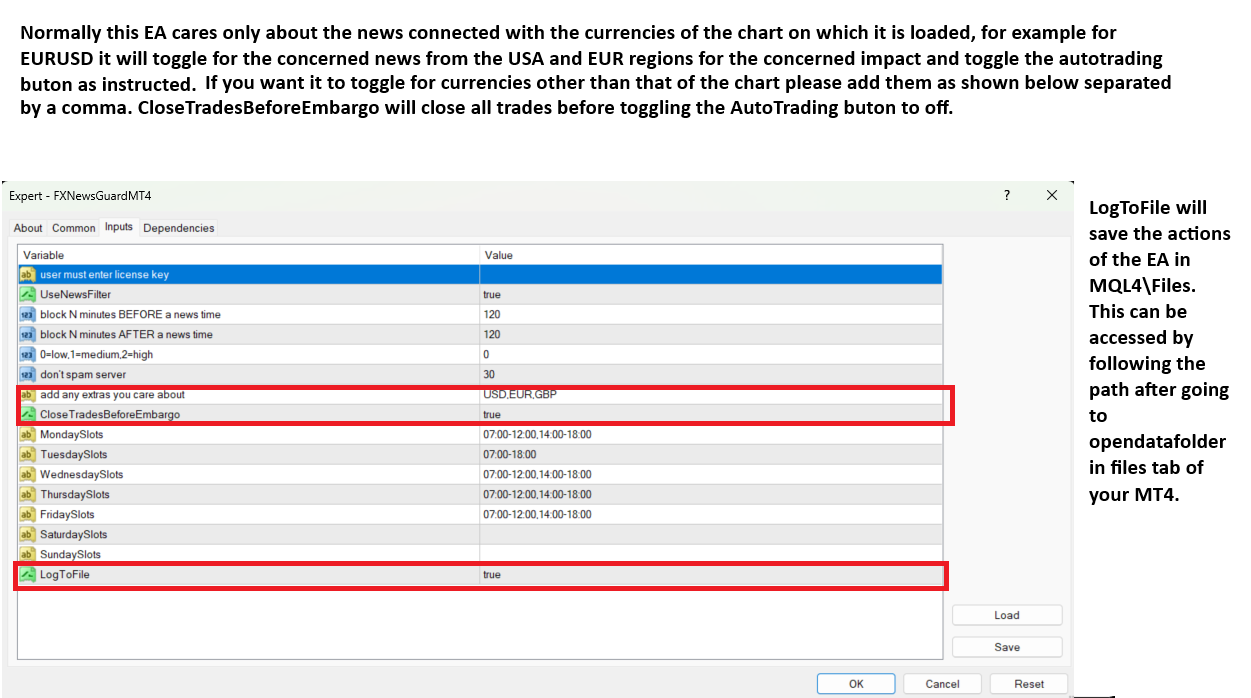
The EA also allows you to track the news events from countries that are in your interest. For example, worried about Nasdaq (US100) ? Then choose only USD related events. There is an additional option to close all your positions before the embargo kicks in as well! Finally, all actions taken by the EA are logged on to a CSV file shown in the location in the image below for you to review what has happened.
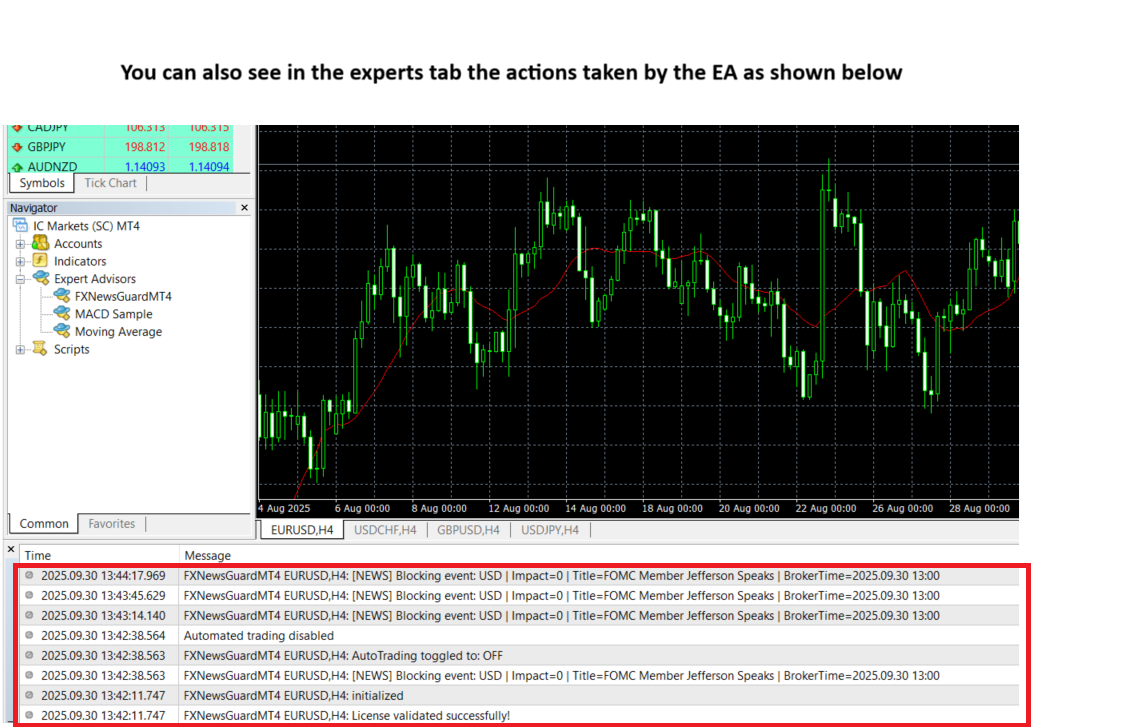
You can also review in the experts tab the actions taken by the EA.
Disclaimer
Not Investment Advice.
FXNewsGuard is a software tool. It does not provide financial, investment, or trading advice. Users are fully responsible for their own trading decisions.
No Guarantee of Profit.
Using FXNewsGuard does not guarantee profits or prevent losses. Trading financial instruments carries inherent risks, and past performance does not indicate future results.
Broker/Prop Firm Compatibility.
FXNewsGuard for MT4 relies on its own external news feed. As long as your broker allows WebRequest connections, the EA will function as expected. Always ensure WebRequest is enabled in MT4 and test compatibility with your broker before live trading.
Market Risks.
High-impact news can create extreme volatility, slippage, widened spreads, or execution delays. FXNewsGuard cannot eliminate these risks, only manage autotrading toggling around news.
Execution Limitations.
The EA may fail to close or block trades if internet connection, VPS, broker server, or MetaTrader terminal encounters disruptions.
Prop Firm Rules.
While FXNewsGuard is designed to assist with prop firm compliance, it is the user’s responsibility to ensure their strategy fully adheres to the firm’s specific rules.
No Liability.
The developer of FXNewsGuard assumes no responsibility for financial losses, missed opportunities, or account breaches resulting from use of the software.
Technical Requirements.
Proper functioning requires:
- MT4 terminal running continuously (or on VPS).
- DLL imports enabled (user32.dll).
- WebRequest enabled (for license verification)
User Responsibility.
By using FXNewsGuard, you acknowledge that you understand the risks of trading and accept full responsibility for your results